

Microsoft Power Platform is a low-code platform for building business apps quickly. It includes five main components: Power Apps, Power Automate, Power BI, Power Pages, and Power Virtual Agents. These components can interact with each other to achieve business objectives, be it building analytics, process automation, or data-driven productivity apps.
The platform uses a low-code approach to build solutions rapidly. It allows everyone in an organization, from frontline workers to professional developers, to participate in building apps that drive positive business outcomes. Developers can work seamlessly with the makers in an organization to help fill gaps and solve complex challenges using a rich extensibility model provided by the platform components. Using native integration with Azure, developers can also use their cloud development skills to extend Microsoft Power Platform. This approach to low-code development is a transformative way to quickly achieve application development objectives within an organization.

Power BI
Power BI is a business analytics service that provides insights for analyzing data. It includes:
- Power BI Desktop: A free application for PCs that allows users to connect to, transform, and visualize their data.
- Power BI Service: An online SaaS service that supports collaboration and sharing of reports and dashboards.
- Power BI Mobile: Mobile apps for Windows, iOS, and Android devices.
- Power BI Report Server: An on-premises report server where users can publish Power BI reports, along with traditional paginated reports.
- Power BI Embedded: A service in Azure that allows developers to embed Power BI reports and dashboards into custom applications.
Power BI integrates with a wide range of data sources, providing interactive visualizations and business intelligence capabilities with an interface simple enough for end users to create their own reports and dashboards.
Power Apps
Power Apps is a suite of apps, services, and connectors, as well as a data platform, that provides a rapid development environment to build custom apps for business needs. It includes:
- Canvas Apps: Allows users to design apps by dragging and dropping elements onto a canvas, connecting to various data sources.
- Model-Driven Apps: Based on the data model, these apps are responsive across devices and are created from data stored in Microsoft Dataverse.
- Portals: Enable users to create external-facing websites that allow users outside their organization to sign in with a variety of identities, create and view data in Dataverse, or browse content anonymously.
Power Apps integrates with multiple data sources, including Microsoft 365, Dynamics 365, SQL Server, and various third-party services.
Power Automate
Power Automate allows users to create automated workflows between applications and services to synchronize files, get notifications, collect data, and more. Key features include:
- Flow Types:
- Automated Flows: Triggered by events, such as receiving an email.
- Button Flows: Triggered manually by the user.
- Scheduled Flows: Run at a specified time.
- Business Process Flows: Guide users through a set of steps in a business process.
- Desktop Flows: Automate tasks on the desktop using robotic process automation (RPA).
- Connectors: Over 900 connectors to various services, enabling workflows across a wide array of applications.
- AI Builder Integration: Allows incorporation of AI models to enhance automation workflows.
- Approval Processes: Create, manage, and track approval workflows directly within Power Automate.
Power Virtual Agents
Power Virtual Agents enables users to create powerful chatbots using a guided, no-code graphical interface. Features include:
- Bot Creation: Simple drag-and-drop interface for building chatbots.
- Integration: Bots can be integrated with various services and data sources using Power Automate.
- Topics: Define conversation topics to guide the chatbot in handling different user interactions.
- Entities: Utilize entities to capture and reuse information across topics.
- Multi-channel Deployment: Deploy bots across multiple channels such as websites, Microsoft Teams, Facebook, and more.
- Analytics: Built-in analytics to monitor bot performance and user interactions.
Power Pages
Power Pages is a secure, enterprise-grade, low-code SaaS platform for creating, hosting, and administering modern external-facing business websites. Key features include:
- Design Studio: A rich, intuitive interface for designing web pages with drag-and-drop components.
- Responsive Design: Ensures websites work seamlessly across various devices and browsers.
- Security: Enterprise-grade security with role-based access control and data protection.
- Integration with Dataverse: Seamless integration with Microsoft Dataverse for managing data and business logic.
- Templates: Pre-built templates for common business scenarios to accelerate development.
- Customization: Advanced customization options with HTML, CSS, and JavaScript.
AI Builder
AI Builder is a plug-in service that allows citizen developers to use, customize, and govern AI models across their organization with a no-code configuration engine. Features include:
- Pre-built AI Models: Models for common scenarios such as form processing, object detection, and sentiment analysis.
- Custom AI Models: Create custom models tailored to specific business needs.
- Integration with Power Platform: Embed AI capabilities into Power Apps and Power Automate workflows.
- Ease of Use: Intuitive interface for building and training models without the need for deep AI expertise.
- Governance: Tools for managing, deploying, and monitoring AI models across the organization.
Microsoft Dataverse
Microsoft Dataverse is a scalable data service and app platform that allows for building scalable and interconnected applications, automations, and agents. Key features include:
- Common Data Model (CDM): Provides a standardized schema for data interoperability.
- Data Integration: Seamless integration with various Microsoft and third-party applications.
- Security: Enterprise-grade security features, including role-based access control and data encryption.
- Scalability: Supports both small and large-scale applications.
- Business Logic: Define business rules, workflows, and process automation directly within Dataverse.
Power Platform Connectors
Power Platform Connectors allow connecting apps, data, and devices in the cloud. Key features include:
- Pre-built Connectors: Over 900 pre-built connectors for services like Salesforce, Office 365, Twitter, Dropbox, Google services, and more.
- Custom Connectors: Build custom connectors to connect to proprietary or on-premises systems.
- Connector Types:
- Standard Connectors: Basic connectors available to all users.
- Premium Connectors: Connectors that require additional licensing.
- Operations:
- Triggers: Events that start a flow.
- Actions: Operations performed by a flow.
Historical Note
The previous version of Microsoft Dataverse was called Common Data Service (CDS). CDS supported a transactional interface. Dataverse supports both transactions and analytics across all Dynamics 365 and Power Platform solutions, including seamless customization and extension directly by enterprise customers. Today, Dataverse is transparently powered by more than 25 fully-managed Azure services.
Roadmap Note
A feature called “View in Microsoft Fabric” for Dataverse is coming later in 2023 to every Dynamics 365 customer. It automatically makes all Dynamics 365 data available for analysis in Microsoft Fabric without having to copy data, build ETL pipelines, or use third-party integration tools.
Environment Security
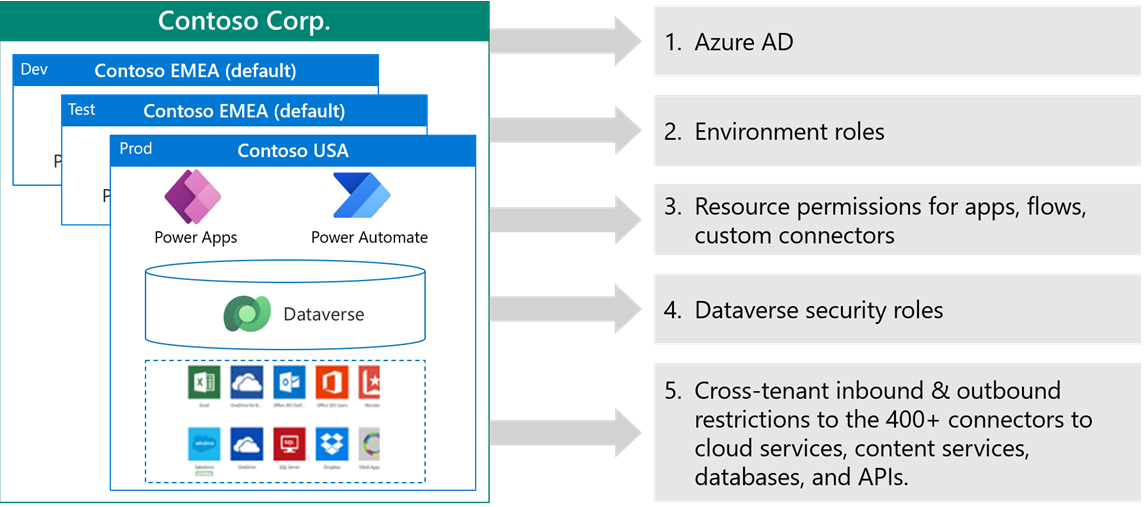
Environments in Power Platform are containers that administrators can use to manage apps, flows, connections, and other assets, along with permissions to allow organization users controlled access to the environment and its resources.
Access to environments is multilayered. Environments are contained within a Microsoft Entra ID tenant. Access to the environment is authenticated by Microsoft Entra ID. Users must have a user account in Microsoft Entra ID to access any environment, and they must have a license to use Microsoft Power Platform. To access an individual environment, the user will need a Microsoft 365 role if a Microsoft Dataverse database is not available, and they’ll need a Dataverse security role if a Dataverse database is available. Users also need to be given permission on resources in an environment such as apps, flows, and connectors.
An administrator can also control access to environments from other Microsoft Entra ID tenants in business-to-business (B2B) scenarios.
Reference Materials
Microsoft Learn:
 Business Excellence